# 自定义音频采集和渲染 (/zh-CN/realtime-media/rtc/build/audio/custom-audio-source/ios)
> For AI agents: see the complete documentation index at [llms.txt](/llms.txt).
声网默认的音频模块可以满足在 App 中使用基本音频功能的需求。声网 SDK 支持使用自定义的音频源和自定义的音频渲染模块为你的 App 添加特殊的音频功能。
## 技术原理 [#技术原理-1]
实时音频传输过程中,声网 SDK 通常会开启默认的音频模块。在以下场景中,你可能会发现默认的音频模块无法满足开发需求,需要自定义音频采集或自定义音频渲染。例如:
- App 中已有自己的音频模块。
- 需要使用前处理库处理采集到的音频。
- 某些音频采集设备被系统独占。为避免与其他业务产生冲突,需要灵活的设备管理策略。
使用自定义音频源管理音频帧的采集、处理和播放时,需要使用声网 SDK 外部方法。
#### 音频数据传输 [#音频数据传输-1]
下图展示在自定义音频采集、音频渲染时,音频数据的传输过程。
**自定义音频采集**
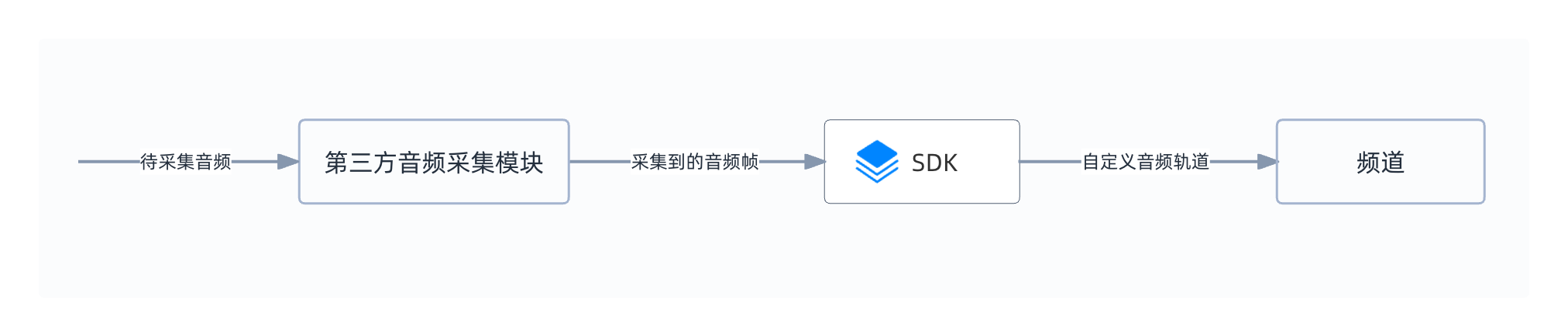
- 你需要使用 SDK 外部方法自行实现采集模块。
- 调用 `pushExternalAudioFrameSampleBuffer` 或 `pushExternalAudioFrameRawData`,将采集到的音频帧发送给 SDK。
**自定义音频渲染**
- 你需要使用 SDK 外部方法自行实现渲染模块。
- 调用 `pullPlaybackAudioFrame` 获取远端用户发送的音频数据。
## 前提条件 [#前提条件-1]
在进行操作之前,请确保你已经在项目中实现了基本的实时音视频功能。详见[实现音视频互动](/zh-CN/realtime-media/rtc/get-started/quick-start)。
## 实现方法 [#实现方法-1]
### 自定义音频采集 [#自定义音频采集-1]
本节介绍如何实现自定义音频采集。
参考以下调用时序图,在你的 App 中实现自定义音频采集:
#### API 调用步骤 [#api-调用步骤-1]
参考如下步骤,在你的项目中实现自定义音频采集功能:
1. 创建自定义音频轨道
初始化 `AgoraRtcEngineKit` 后,调用 `createCustomAudioTrack` 创建自定义音频轨道并获得音频轨道 ID。
```swift
let audioTrack = AgoraAudioTrackConfig()
audioTrack.enableLocalPlayback = true
trackId = agoraKit.createCustomAudioTrack(.mixable, config: audioTrack)
```
2. 加入频道并发布自定义音频轨道
调用 `joinChannelByToken`[2/4] 加入频道,在 `AgoraRtcChannelMediaOptions` 中,将 `publishCustomAudioTrackId` 参数设置为步骤 1 中获得的音频轨道 ID,并将 `publishCustomAudioTrack` 设置为 `YES`,即可在频道中发布指定的自定义音频轨道。
:::warning[注意]
如需调用 `enableCustomAudioLocalPlayback` 在本地播放外部音频源,或调用 `adjustCustomAudioPlayoutVolume` 调节自定义音频采集轨道在本地播放的音量,请将 `AgoraRtcChannelMediaOptions` 中的 `enableAudioRecordingOrPlayout` 设置为 `YES`。
:::
```swift
let option = AgoraRtcChannelMediaOptions()
// 音频自采集场景下,不发布麦克风采集的音频
option.publishMicrophoneTrack = false;
// 发布自采集音频流
option.publishCustomAudioTrack = true
// 设置自定义音频轨道 ID
option.publishCustomAudioTrackId = Int(trackId)
option.clientRoleType = GlobalSettings.shared.getUserRole()
NetworkManager.shared.generateToken(channelName: channelName, success: { token in
// 加入频道
let result = self.agoraKit.joinChannel(byToken: token, channelId: channelName, uid: 0, mediaOptions: option)
if result != 0 {
self.showAlert(title: "Error", message: "joinChannel call failed: \(result), please check your params")
}
})
```
3. 实现自采集模块
声网提供了 [CustomPcmAudioSource.swift](https://github.com/Shengwang-Community/API-Examples/tree/main/iOS/APIExample/APIExample/Examples/Advanced/CustomPcmAudioSource) 示例项目,演示从本地文件读取 PCM 格式的音频数据。在实际项目中,你需要结合业务创建自定义音频采集模块。
4. 通过自定义音频轨道推送音频数据到 SDK
调用 `pushExternalAudioFrameRawData` 将采集到的音频帧通过自定义音频轨道推送至 SDK。其中,`trackId` 要与步骤 2 加入频道时指定的音频轨道 ID 一致,`sampleRate`、`channels` 和 `samples` 用于设置外部音频帧的采样率、声道数和采样数。
:::info[信息]
- 为确保音视频同步,声网建议你调用 `getCurrentMonotonicTimeInMs` 获取当前的 Monotonic Time,将 `timestamp`(时间戳)设置为系统 Monotonic Time。
- 如果需要推送 CMSampleBuffer 格式的音频帧,请改用 `pushExternalAudioFrameSampleBuffer`。
:::
```swift
extension CustomAudioSource: AgoraPcmSourcePushDelegate {
func onAudioFrame(data: UnsafeMutablePointer) {
agoraKit.pushExternalAudioFrameRawData(data,
samples: samples,
sampleRate: Int(sampleRate),
channels: Int(audioChannel),
trackId: Int(trackId),
timestamp: 0)
}
}
```
5. 销毁自定义音频轨道
如果你需要停止发布自定义采集的音频,调用 `destroyCustomAudioTrack` 销毁自定义音频轨道。
```swift
agoraKit.destroyCustomAudioTrack(Int(trackId))
```
### 自定义音频渲染 [#自定义音频渲染-1]
本节介绍如何实现自定义音频渲染。
开始前,请确保你的项目中已实现原始音频数据的采集和处理。详见[原始音频数据](/zh-CN/realtime-media/rtc/build/audio/raw-audio-data)。
参考如下步骤,在你的项目中调用原始音频数据 API 实现自定义音频渲染:
1. 从 `onRecordAudioFrame`,`onPlaybackAudioFrame`,`onMixedAudioFrame` 或 `onPlaybackAudioFrameBeforeMixing` 获取待播放的音频数据。
2. 自行渲染并播放音频数据。
## 参考信息 [#参考信息-1]
### 示例项目 [#示例项目-1]
声网提供了开源的音频自采集和音频自渲染的示例项目供你参考,你可以前往下载或查看其中的源代码。
CustomPcmAudioSource} href="https://gitee.com/agoraio-community/API-Examples/tree/main/iOS/APIExample/APIExample/Examples/Advanced/CustomPcmAudioSource" />
CustomPcmAudioSource} href="https://github.com/Shengwang-Community/API-Examples/tree/main/iOS/APIExample/APIExample/Examples/Advanced/CustomPcmAudioSource" />
CustomAudioRender} href="https://gitee.com/agoraio-community/API-Examples/tree/main/iOS/APIExample/APIExample/Examples/Advanced/CustomAudioRender" />
CustomAudioRender} href="https://github.com/Shengwang-Community/API-Examples/tree/main/iOS/APIExample/APIExample/Examples/Advanced/CustomAudioRender" />
### API 参考 [#api-参考-1]
- [`createCustomAudioTrack`](/zh-CN/api-reference/rtc/ios/audio/audio-custom-capturenrendering#api_irtcengine_createcustomaudiotrack)
- [`destroyCustomAudioTrack`](/zh-CN/api-reference/rtc/ios/audio/audio-custom-capturenrendering#destroycustomaudiotrack)
- [`pushExternalAudioFrameRawData`](/zh-CN/api-reference/rtc/ios/audio/audio-custom-capturenrendering#api_irtcengine_pushaudioframe2)
- [`pushExternalAudioFrameSampleBuffer` [2/2]](/zh-CN/api-reference/rtc/ios/audio/audio-custom-capturenrendering#api_irtcengine_pushexternalaudioframesamplebuffer2)
- [`enableExternalAudioSink`](/zh-CN/api-reference/rtc/ios/audio/audio-custom-capturenrendering#api_irtcengine_setexternalaudiosink)
- [`pullPlaybackAudioFrameRawData`](/zh-CN/api-reference/rtc/ios/audio/audio-custom-capturenrendering#api_irtcengine_pullaudioframe)