# 跑通示例项目 (/zh-CN/solutions/chatroom/uikit/build/run-github-project/ios)
> For AI agents: see the complete documentation index at [llms.txt](/llms.txt).
本文介绍如何快速跑通如下示例项目,体验在线语聊房。
如需更深入了解项目代码,请参考如下示例项目:
## 项目技术架构 [#项目技术架构-1]
本节介绍项目的技术架构:
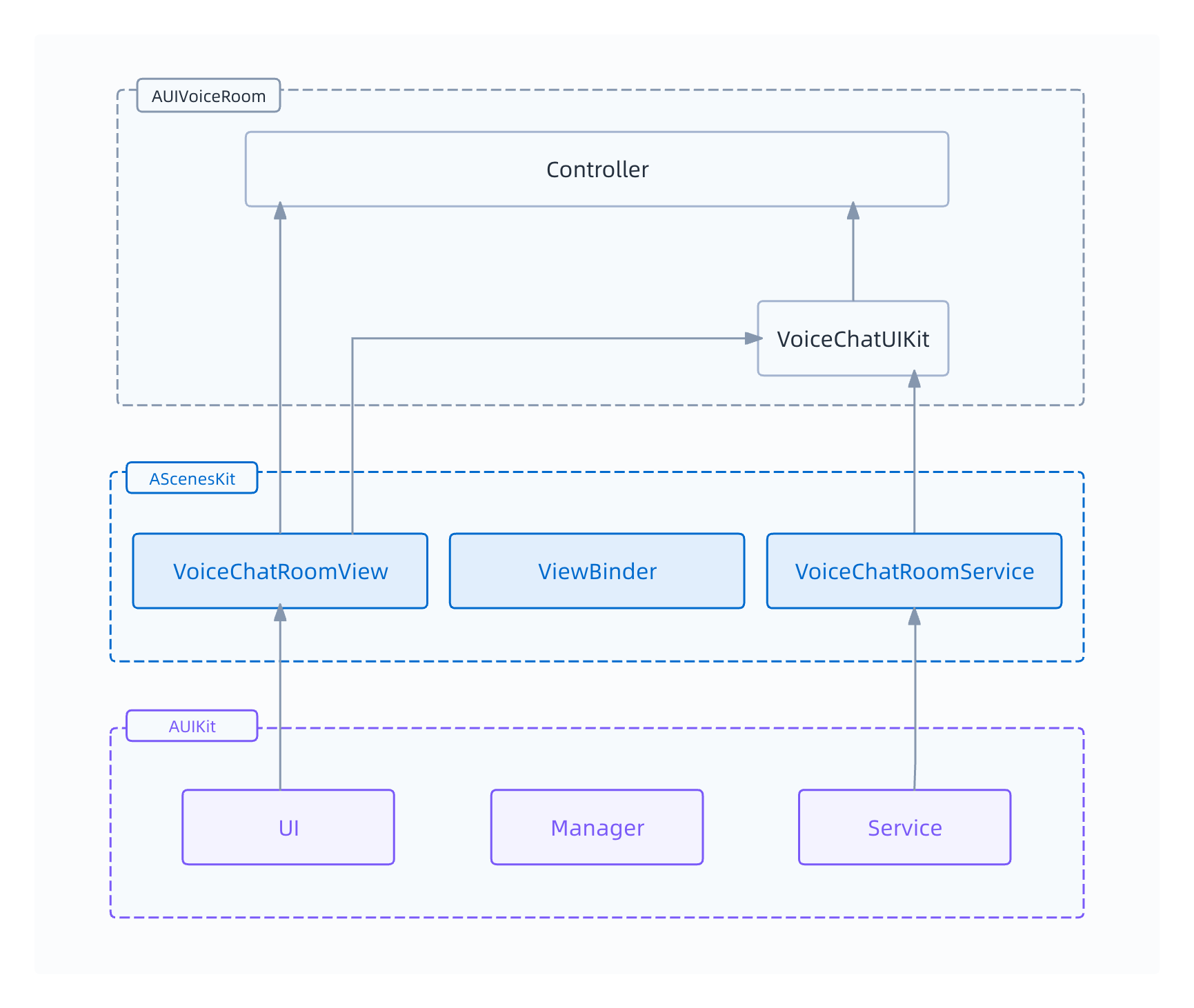
`AUIVoiceRoom` 依赖于 `ASceneKit`,`ASceneKit` 依赖于底层的 `AUIKit`。详细说明如下:
- `AUIVoiceRoom`:代表语聊房 App。该部分需要你自行开发维护。
- `Controller`:用于管理语聊 App 中房间列表页面和单个房间的详情页面。
- `VoiceChatUIKit`:负责统一调度 `VoiceChatRoomView` 和 `VoiceChatRoomService`,并管理房间。
- `AScenesKit`:为语聊场景提供业务逻辑的组装模块。该部分由声网提供并维护。
- `VoiceChatRoomView`:语聊房的容器 View。用于管理 `AUIKit` 提供的 UI。
- `VoiceChatRoomService`:语聊房的 Service。用于管理 `AUIKit` 提供的 Service。
- `ViewBinder`:用于将 `VoiceChatRoomView` 和 `VoiceChatRoomService` 绑定。
- `AUIKit`:基础库。该部分由声网提供并维护。
- UI:基础 UI 组件。
- Manager:管理环信即时通讯 IM(`AUIChatManager`)、实时消息 RTM(`AUIRtmManager`)、房间(`AUIRoomManager`)等模块。
- Service:上麦、聊天、送礼物等业务能力。
## 前提条件 [#前提条件-1]
- [Git](https://git-scm.com/downloads)
- [CocoaPods](https://guides.cocoapods.org/using/getting-started.html#getting-started) 1.12.0 及以上
- [Xcode](https://apps.apple.com/cn/app/xcode/id497799835?mt=12) 13.0 及以上
- iOS 设备,版本 13.0 及以上
- 有效的苹果开发者账号
- [开通语聊房 UIKit 相关服务](/zh-CN/solutions/chatroom/uikit/build/enable-service)
:::warning[注意]
- 如果 CocoaPods 版本低于 1.12.0,你会遇到[常见问题](#常见问题)。
- 声网推荐使用真机运行项目。部分模拟机可能存在功能缺失或者性能问题。
:::
## 克隆仓库 [#克隆仓库-1]
在本地任意工作目录下运行以下命令,将 `AUIVoiceRoom` 仓库克隆到本地:
```shell
git clone git@github.com:AgoraIO-Community/AUIVoiceRoom.git
```
## 配置示例项目 [#配置示例项目-1]
1. (可选)参考[使用语聊后端服务](/zh-CN/solutions/chatroom/uikit/build/run-github-project-backend)进行部署。
2. 在 `AUIVoiceRoom/iOS/AUIVoiceRoom/AUIVoiceRoom/KeyCenter.swift` 文件中设置如下参数:
```swift
static var HostUrl: String = <#your_host_url#>
static var AppId: String = <#your_app_id#>
static var AppCertificate: String = <#your_app_cert#>
static var AppBasicAuth: String = <#your_http_basic_auth#>
static var IMAppKey: String = <#your_easemob_app_key#>
static var IMClientId: String = <#your_easemob_client_id#>
static var IMClientSecret: String = <#your_easemob_client_secret#>
```
| 参数名 | 参数描述 |
|------------------|----------------------------------|
| `HostUrl` | 语聊后端服务的 Host URL。如果你暂时无意部署后端服务,可以使用 `https://service.shengwang.cn/uikit-v2` 作为 Host URL。这是声网为测试体验提供的地址,请你不要商用。 |
| `AppId` | 声网项目的 App ID,详见[获取 App ID](/zh-CN/solutions/chatroom/uikit/build/enable-service#获取-app-id)。 |
| `AppCertificate` | 声网项目的 App 证书,详见[获取 App 证书](/zh-CN/solutions/chatroom/uikit/build/enable-service#获取-app-证书)。 |
| `AppBasicAuth` | 声网 RESTful 服务所需的 HTTP 基本认证的 `Authorization` 值。请先获取[客户 ID 和客户密钥](/zh-CN/solutions/chatroom/uikit/build/enable-service#获取客户-id-和客户密钥),再生成 [HTTP 基本认证](/zh-CN/realtime-media/rtc/build/setup-and-access/http-basic-auth) 的 `Authorization` 值。 |
| `IMAppKey` | 环信 IM 服务的 App Key,详见[获取 IM 信息](https://doc.easemob.com/product/console/app_manage.html)。 |
| `IMClientId` | 环信 IM 服务的 Client ID。登录[环信管理后台](https://console.easemob.com),到**应用列表** > **查看**获取。 |
| `IMClientSecret` | 环信 IM 服务的 Client Secret。登录[环信管理后台](https://console.easemob.com),到**应用列表** > **查看**获取。 |
## 安装依赖 [#安装依赖]
在 `AUIVoiceRoom/iOS/AUIVoiceRoom` 目录下运行 `pod update`,然后等待依赖库安装完成。
## 编译并运行示例项目 [#编译并运行示例项目-1]
1. 连接上 iOS 设备,点击 `AUIVoiceRoom.xcworkspace` 文件以通过 Xcode 打开项目,并在 **iOS Device** 选项中勾选上你的 iOS 设备。
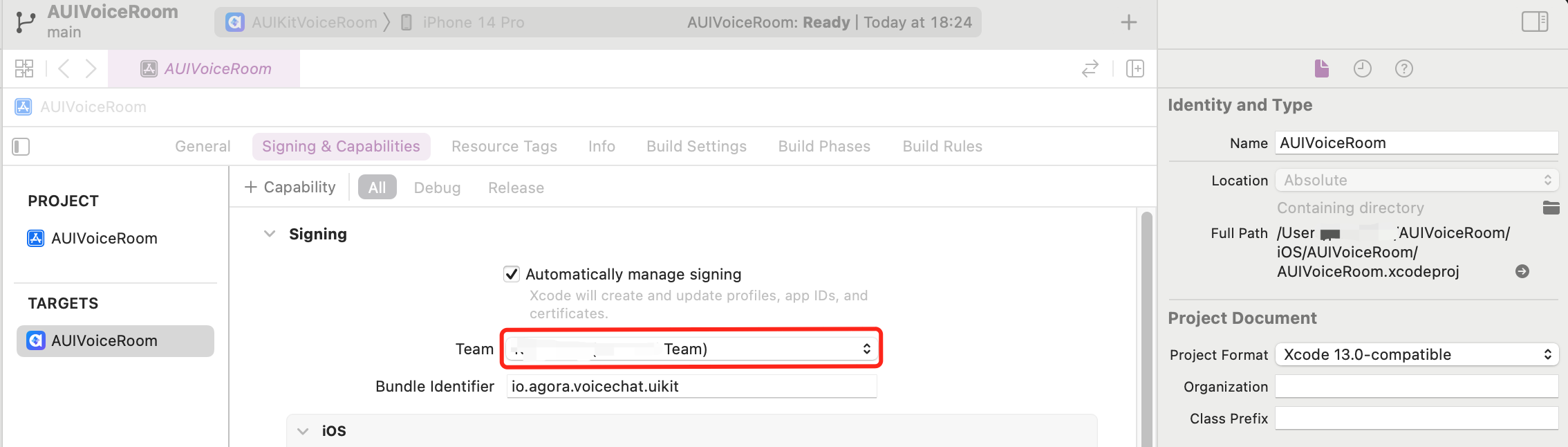
2. 在项目 **TARGETS** 下的 **Signing & Capabilities** 界面勾选 **Automatically manage signing**,配置你的苹果开发者账号和 **Bundle Identifier**。Bundle ID 用于在设备上唯一标识应用程序。在开发应用时,你需要设置 Bundle ID。
3. 点击 开始编译。
4. 编译成功后,你的 iOS 设备上会出现语聊 App。在 iOS 系统设置中将该应用设为信任开发者后你才能打开应用。
5. 打开应用,即可进行体验。房主可以创建语聊房;观众可以加入语聊房。
## 常见问题 [#常见问题]
如果 CocoaPods 版本低于 1.12.0,你可能遇到如下问题:
问题一:执行 `pod update` 命令后,收到如下报错信息:
- `the version of cocoapods to generate the lockfile(1.12.0) is higher than the version of the current executable(1.11.2). `
- `can't modify frozen string: "[Xcodeproject] unknown object version (56).`
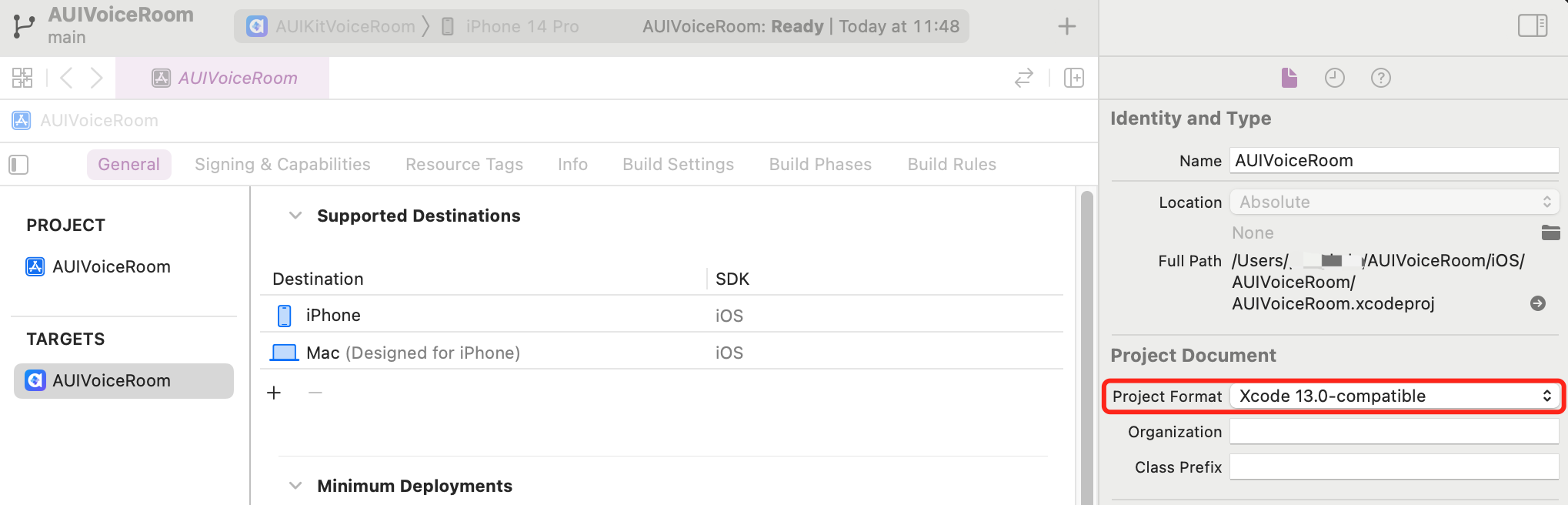
解决方法:在 **General** 页面下,将 **Project Format** 选项修改为 **Xcode 13.0-compatible**。如下图所示:
问题二:通过 Xcode 打开 `AUIVoiceRoom.xcworkspace` 文件时,收到如下报错信息:
`Signing for "AUIVoiceRoom" requires a development team. Select a development team in the Signing & Capabilities editor.`
解决方法:在 **Signing & Capabilities** 页面下,设置 **Team** 选项内容。如下图所示: